| Field | Details |
|---|---|
| Portal Name | Rajasthan Single Sign-On (RajSSO) |
| Official Website | sso.rajasthan.gov.in |
| State | Rajasthan, India |
| Department | DoIT & C (Dept. of Information Technology & Communication) |
| Purpose | To provide one login ID for all government services (One-stop solution). |
| Accessibility | Available on Web Browsers, Mobile App, and e-Mitra Centers. |
| Main Services | Job Exams (OTR), Scholarships, Bill Payments, and Land Records. |
| Registration | Free of cost; requires Aadhaar, Jan Aadhaar, or Google ID. |
Key Features of the Rajasthan SSO Portal
The SSO portal is designed to provide convenience, security, and efficiency. Here are its major features:
- Single Login Access: Use one unique ID to access all integrated government services.
- One-Time Registration (OTR): Register your details once to apply for multiple government job vacancies easily.
- Real-Time Tracking: Monitor the status of your applications or service requests at any time.
- Digital Document Storage: Securely store and access your certificates and official documents online.
- Multi-Platform Access: The portal is fully accessible via both web browsers and mobile applications.
- Enhanced Security: Protects user data through OTP (One-Time Password) and biometric authentication.
The portal acts as a centralized hub, seamlessly connecting citizens to multiple government departments.
Services Available on the Rajasthan SSO Portal
The Rajasthan SSO portal offers a wide range of services categorized for easy access:
1. Government Services
- Employment & Recruitment: Access portals for RPSC (Rajasthan Public Service Commission) and RSSB (Rajasthan Staff Selection Board) to apply for government jobs.
- Education: Apply for various scholarships, manage school or college admissions, and track academic progress.
- Health Services: Access digital health records, hospital registration, and state-specific health insurance schemes.
- Land Records: View and download land maps, ownership details, and other property-related documents.
- Police & Complaint Services: File online complaints (e-FIR) and access police verification services.
- Social Welfare Schemes: Register for and track benefits from various state-funded welfare programs.
2. Other Digital Services
- e-Mitra Services: Access a vast network of G2C (Government to Citizen) services through the integrated e-Mitra portal.
- Utility Bill Payments: Pay electricity, water, and gas bills directly through the platform.
- GST Services: Manage GST-related filings and business taxation requirements.
- Business Registration: Simplify the process of registering new businesses and obtaining necessary state licenses.
These integrated features make the SSO ID a true “one-stop solution” for all government-related needs in Rajasthan.
How to Register for a Rajasthan SSO ID
Follow these simple steps to create your account:
- Visit the Official Website: Go to the official Rajasthan SSO portal (sso.rajasthan.gov.in).
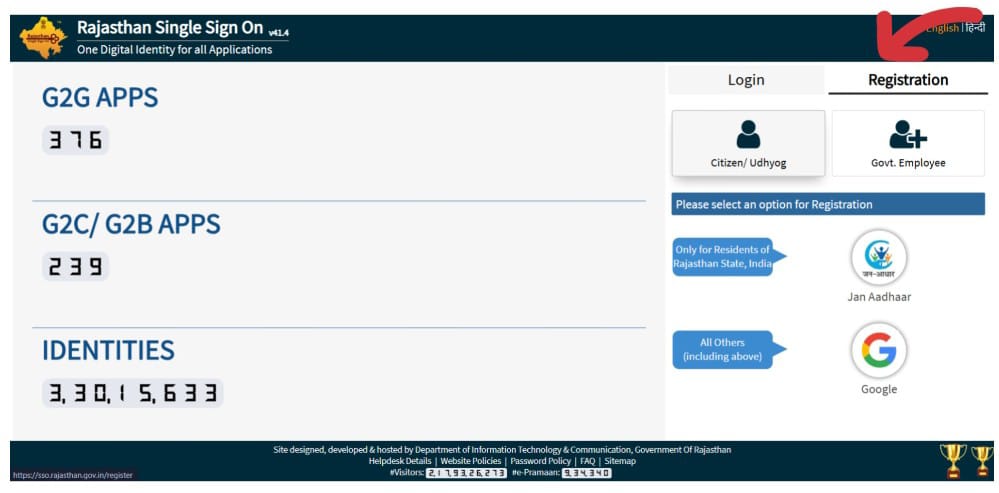
- Click on “Registration”: Select the “Registration” tab on the login page.
-
Choose Your Registration Category: Select the option that applies to you:
- Citizen: For individual residents of Rajasthan.
- UDYOG (Business): For business owners or industries with a BRN (Business Registration Number).
- Govt. Employee: For active employees of the Government of Rajasthan (using SIPF details).
- Enter Your Identity Details: Link your account using your Jan Aadhaar, Aadhaar Card, or Google Account (for citizens).
- Verify via OTP: Enter the One-Time Password (OTP) sent to your registered mobile number to verify your identity.
- Set Your Credentials: Create a unique username (SSO ID) and a strong password.
Once these steps are complete, your SSO ID will be successfully created, and you can begin accessing government services immediately.
How to Login to the Rajasthan SSO Portal
Follow these steps to access your account:
- Go to the Official Portal: Navigate to the official SSO Rajasthan website.
- Enter Your Credentials: Provide your unique SSO ID (Username) and Password in the designated fields.
- Enter the Captcha: Type the security code (Captcha) as shown in the image to verify you are a human user.
- Click on “Login”: Select the login button to proceed.
- Complete OTP Verification: If you have enabled two-factor authentication, enter the OTP (One-Time Password) sent to your registered mobile number.
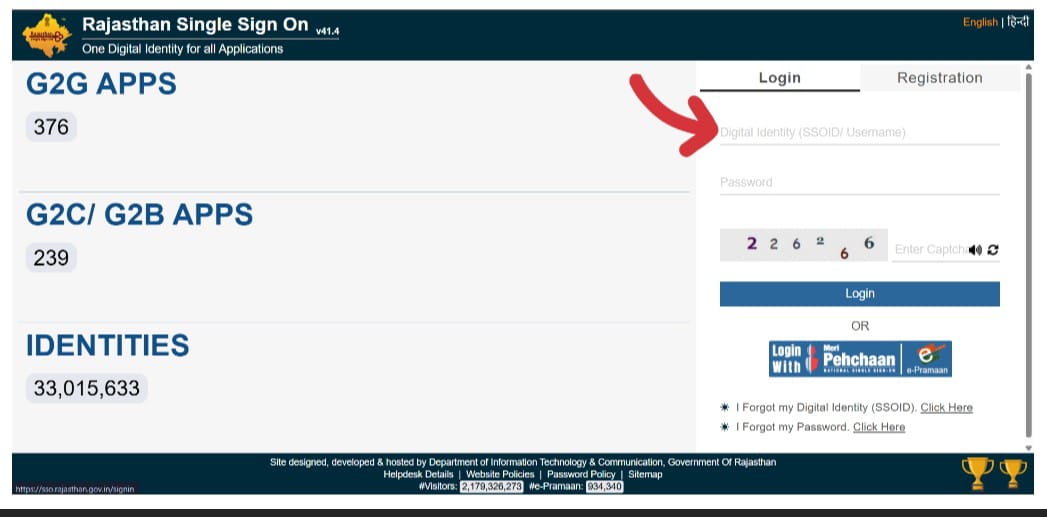
Once logged in, you will be directed to your personalized dashboard, where you can view and access all available government services.
Who Can Use a Rajasthan SSO ID?
The SSO ID is a universal platform designed to benefit every resident and professional within the state. It is particularly useful for:
- Citizens of Rajasthan: Any resident can use the portal to access social welfare schemes, pay utility bills, and download official certificates.
- Students: Students can apply for state-funded scholarships, manage college admissions, and access digital learning resources.
- Job Seekers: Aspirants can complete their One-Time Registration (OTR) to apply for various government recruitment exams (like RPSC and RSSB) without re-entering their data.
- Business Owners: Entrepreneurs and industry leaders can register their businesses (Udyog), apply for licenses, and manage state-level taxation.
- Government Employees: Active employees can manage their SIPF (State Insurance and Provident Fund) accounts, track leave, and access departmental services.
Essentially, the portal serves as a unified digital bridge connecting all individuals in the state to the government.
Documents Required for SSO ID Registration
To ensure a smooth registration process, please have the following details and documents ready based on your category:
For Citizens
- Jan Aadhaar Card: Highly recommended for residents to access all state-specific welfare schemes.
- Aadhaar Card: Used for primary identity verification via OTP.
- Active Mobile Number: Must be linked to your Aadhaar/Jan Aadhaar for OTP authentication.
- Valid Email ID: Required for account recovery and receiving official notifications.
For Businesses (Udhyog)
- Business Registration Number (BRN): Necessary for industry-level registration.
- Udyog Aadhaar / Udyam Registration: For small and medium enterprises.
For Government Employees
- SIPF ID: Your State Insurance and Provident Fund number is mandatory for creating a government employee profile.
Eligibility Criteria for Rajasthan SSO ID
The Rajasthan SSO portal is an inclusive platform designed for various categories of users. To create an ID, you must fall into one of the following groups:
1. Residents of Rajasthan (Citizens)
Any individual who is a permanent resident of Rajasthan is eligible to create an SSO ID.
- Requirement: You should ideally have a Jan Aadhaar Card or an Aadhaar Card for identity verification.
- Purpose: This allows citizens to apply for scholarships, access health services, and benefit from various state welfare schemes.
2. Business Entities (Udhyog)
Entrepreneurs, shop owners, and industrial units operating within Rajasthan can register under the “Udhyog” category.
- Requirement: A valid Business Registration Number (BRN), Udyog Aadhaar, or Sanstha ID is required.
- Purpose: This enables businesses to apply for licenses, manage GST-related services, and interact with the Department of Industries.
3. Government Employees
Current employees of the Government of Rajasthan are eligible for a specialized SSO ID linked to their service records.
- Requirement: A valid SIPF ID (State Insurance and Provident Fund) is mandatory for this registration.
- Purpose: Employees use this to manage their service books, apply for leave, and track their provident fund and insurance details.
Why is the Rajasthan SSO ID Important?
The SSO portal represents a significant step toward Digital India and e-Governance. It transforms how citizens interact with the state by providing several key advantages:
- Reduces Corruption and Manual Intervention: By digitizing the application and approval process, the portal minimizes the need for physical visits to government offices and reduces middleman interference.
- Saves Time and Effort: Citizens no longer need to fill out repetitive forms or travel long distances. A single profile handles multiple applications instantly.
- Enhances Transparency: Users can track the real-time status of their applications, ensuring that the government remains accountable and the process stays clear.
- 24/7 Accessibility: Government services are no longer limited by office hours. The portal makes essential services accessible anytime and anywhere via the internet.
- Data Security: By centralizing personal records, the system ensures that sensitive documents are stored in a secure, encrypted digital environment.
How to Recover your SSO ID or Reset your Password
If you have lost access to your account, the Rajasthan SSO portal provides simple recovery options. Follow these steps to get back online:
1. Forgotten SSO ID (Digital Identity)
If you cannot remember your username:
- Visit the Login Page: Click on the “I forgot my Digital Identity (SSO ID)” link.
- Select Recovery Method: Choose to recover via Aadhaar, Jan Aadhaar, or your registered Mobile Number.
- OTP Verification: Enter your details to receive a One-Time Password (OTP) on your registered mobile phone.
- Receive ID: Once verified, your SSO ID will be sent to you via SMS.
2. Forgotten Password (Reset Steps)
If you know your ID but forgot the password:
- Click “Forgot Password”: Select the “I forgot my Password” link on the main portal.
- Enter Credentials: Provide your SSO ID and choose a verification method (Mobile, Email, or Aadhaar).
- Verification: Enter the OTP sent to your chosen device.
- Create New Password: Once the OTP is verified, you will be prompted to create a new, strong password.
How to Recover a Forgotten SSO ID (Username)
If you have forgotten your Rajasthan SSO ID, don’t worry—you can retrieve it in just a few minutes using your registered identity documents or mobile number.
Method 1: Recover via Mobile Number (SMS)
This is the fastest way to get your username back:
- Visit the Portal: Go to the official SSO Rajasthan login page.
- Select Recovery Link: Click on the link that says “I forgot my Digital Identity (SSO ID).”
- Choose “Mobile”: Select the mobile option and enter your registered 10-digit mobile number.
- Verify OTP: You will receive a One-Time Password (OTP) via SMS. Enter it on the screen to verify your identity.
- Receive Your ID: Once verified, your SSO ID will be sent directly to your mobile phone as a text message.
Method 2: Recover via Aadhaar or Jan Aadhaar
If you don’t have access to your mobile or prefer using your official ID:
- Select Identity Type: On the recovery page, choose either Aadhaar or Jan Aadhaar.
- Enter ID Number: Provide your 12-digit Aadhaar number or your Jan Aadhaar ID.
- Authentication: The system will fetch your linked mobile number. Click “Send OTP.”
- OTP Verification: Enter the code sent to the mobile number linked with your Aadhaar/Jan Aadhaar.
- ID Retrieval: Your username will be displayed on the screen or sent to your registered contact details.
One-Time Registration (OTR) for Rajasthan Government Jobs
The One-Time Registration (OTR) feature on the Rajasthan SSO portal is a mandatory step for candidates aspiring to join the state civil services. It is designed to simplify the recruitment process by creating a permanent profile for every applicant.
What is One-Time Registration (OTR)?
OTR is a specialized service within the SSO portal that allows you to enter your personal, educational, and identity details just once. Instead of filling out a fresh application form for every single vacancy, the system pulls your saved data automatically.
How OTR Benefits Job Seekers
- Eliminates Repetitive Tasks: You don’t need to upload your photo, signature, or marksheets every time a new job notification is released.
- Reduces Errors: Since your basic details (Name, DOB, Category) are verified via Aadhaar or Jan Aadhaar, there is a much lower risk of making mistakes on your application.
- Instant Application: Once your OTR is complete, applying for a new position is as simple as clicking a “Apply Now” button and paying the fee.
- Centralized Tracking: You can download your admit cards, check exam results, and view your application history all from one “Recruitment Portal” dashboard.
Major Recruitment Boards Using OTR
The OTR system is primarily used for exams conducted by:
- RPSC (Rajasthan Public Service Commission): For Grade I, II, and administrative services (RAS).
- RSSB (Rajasthan Staff Selection Board): For various subordinate and ministerial posts like Patwari, LDC, and VDO.
Rajasthan SSO ID for Businesses (Udhyog)
The SSO portal acts as a Single Window Clearance System, allowing business owners to interact with various government departments without visiting multiple offices.
1. Registering as a “Udhyog” (Business)
To access business-specific services, you must select the “Udhyog” category during the registration process. You will typically need one of the following to verify your business identity:
- Business Registration Number (BRN)
- Udyog Aadhaar / Udyam Registration
- SANSTHA ID
2. Key Business Services Available
- Business Registration: Apply for new business incorporations and obtain “Startup Rajasthan” recognition.
- GST Services: Integrated links for GST registration, filing, and state-level taxation queries.
- Licenses & Permits: Easily apply for trade licenses, factory licenses, and environmental clearances.
- Compliance & Renewals: Track the status of your annual filings and renew professional licenses directly through the dashboard.
- Labor & Employment: Register your workforce under state labor laws and manage employee insurance (ESI/PF) contributions.
Common Problems & Solutions: SSO Rajasthan Portal
While the SSO portal is a robust system, users occasionally encounter technical hurdles. Here are the most common issues and how to resolve them:
1. Login Not Working (Invalid Credentials)
- The Problem: You receive an “Invalid Username or Password” error.
- The Solution: Double-check your SSO ID and Password for typos or extra spaces. If the issue persists, use the “Forgot Password” link to reset your credentials. Ensure your keyboard’s “Caps Lock” is turned off.
2. OTP (One-Time Password) Not Received
- The Problem: You are not receiving the verification code on your mobile or email.
- The Solution:
- Verify that your mobile number is correctly linked to your Aadhaar/Jan Aadhaar.
- Check if your inbox is full or if the SMS is in your “Spam” folder.
- Wait for 2–3 minutes before clicking “Resend OTP,” as network delays are common.
3. SSO Account Locked
- The Problem: Your account is temporarily disabled due to multiple failed login attempts.
- The Solution: The system usually unlocks automatically after 30 to 60 minutes. If it remains locked, contact the SSO Helpdesk or use the “Forgot Password” feature to re-verify your identity and regain access.
4. Server Issues or Site Not Loading
- The Problem: The website is slow, shows a “500 Internal Server Error,” or fails to load.
- The Solution: This usually happens during peak hours (like the last date of a major job recruitment).
- Try clearing your browser cache and cookies.
- Switch to a different browser (Google Chrome or Mozilla Firefox are recommended).
- If the server is down for maintenance, try logging in during off-peak hours (early morning or late at night).
Official Rajasthan SSO Support & Contact Details
If you encounter any technical difficulties or have queries regarding your account, you can reach out to the official helpdesk through the following channels:
| Support Channel | Contact Details |
|---|---|
| 📞 Helpline Number | +91-141-2922244 / +91-141-2922245 |
| 📧 Email Support | helpdesk.sso@rajasthan.gov.in |
| 📍 Office Address | IT Building, Yojana Bhawan Campus, Tilak Marg, C-Scheme, Jaipur, Rajasthan |
Conclusion
The Rajasthan SSO ID portal is a transformative digital initiative that significantly simplifies access to essential government services. By offering a Single Sign-On solution, it empowers users to manage everything—from job applications to utility bill payments—with maximum efficiency and minimal effort.
For any resident of Rajasthan, creating an SSO ID is no longer just a convenience; it is essential to fully benefit from the state’s expanding range of online government services.
FAQs
1. What should I do if I forget my SSO ID or Password?
If you forget your credentials, click on the “Forgot My Digital Identity (SSO ID)” or “Forgot My Password” links on the login page. You can recover them by entering your registered mobile number, email ID, or Aadhaar/Jan Aadhaar number to receive an OTP.
2. Can I have more than one SSO ID?
No, a citizen should only have one unique SSO ID linked to their Aadhaar or Jan Aadhaar. Creating multiple IDs can lead to technical conflicts when applying for government jobs or scholarships.
3. Is it mandatory to link Aadhaar or Jan Aadhaar?
While you can initially register using a Google or Facebook account, linking your Aadhaar or Jan Aadhaar is mandatory to access most government services, verify your identity, and receive direct benefit transfers (DBT).
4. How can I update my profile information in the SSO portal?
To update your details, log in to your dashboard and click on the “Edit Profile” icon (usually a pencil or user icon at the top). You can update your mobile number, email, and address, though some fields may require OTP verification via Aadhaar.
5. Why am I not receiving the OTP on my mobile?
If you aren’t receiving an OTP, ensure your mobile number is correctly linked to your Aadhaar/Jan Aadhaar. Also, check if your network provider is blocking promotional or service SMS. If the issue persists, try resending the OTP after a few minutes.
6. Is the SSO Rajasthan portal safe to use?
Yes, the portal is a highly secure government platform. it uses SSL encryption and multi-factor authentication (OTP/Biometrics) to ensure that your personal data and documents remain protected from unauthorized access.